Race Management
Race Management - WATCH OUR VIDEO TUTORIAL
(N.B. Sailing Instructions take precedence over this section which is for guidance only)
There is a folder of suggested courses for wind direction in the race box and on the committee boat
- Always start with a beat, and try to include 1 long beat or 2 short beats, a run and a reach. Use the Committee Boat to set the Starting Line at 90 degrees to the wind direction and length of at least one boat length per competitor.
- Decide on the course making sure that each mark is a rounding mark (i.e. if a string representing the wake of a boat sailing the course was pulled tight it would contact all marks of the course) or a gate (G). Display the course, start line mark and number of rounds.
- In order to calculate the corrected times for the handicap fleet only complete laps can be used, i.e. the start and finish should be at the same point.
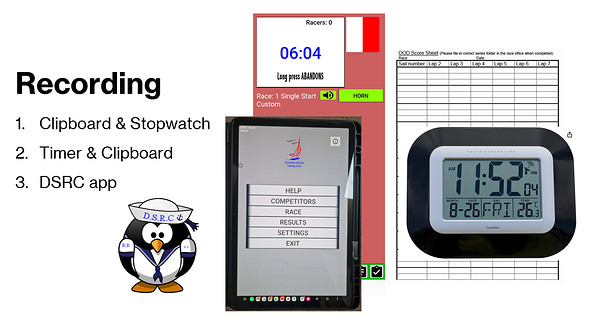
- Timing and recording can be done manually with a score sheet and GPS clock/watch or using the new Race Timer as a timer and sound signaller or with full competitor info. More Info and Videos
- Record the Starting Times on the OOD score sheet for each start and aim for 40-60 minute race. Do not leave too long between races. Half an hour for the average boat is long enough, except for lunch time.
- Record the elapsed time as boats complete each lap. This helps work out how many laps the boats will achieve in 50 minutes. Faster boats will generally do 1 more lap than slower boats.
- When ready to shorten choose a suitable gap in the fleet which will capture the fleet in the shortest time window.
- The blue finish flag should not be hoisted until boats are on their final lap and the committee boat is in position. The shorten course flag can be raised any time before the finish line but ideally as the first boat rounds the final mark provided it is close enough to be heard.
- Time all boats over the finishing line for all types of racing except pursuit; positions for class racing can be determined from these times by the Sailwave program. Note them even if you intend to disqualify, there may be a protest against you.
- Enter results into Sailwave on the computer in the Race Control Office. Try and resolve any anomalies including unknown sail numbers by using the sign-on sheets and asking competitors print the series results and file the OOD score sheet in the correct folder.
Upload the results to the website as per the instructions website and notice board or link below, If you have any queries or difficulties please contact results@shsc.org.uk
All OOD's will be required to publish race results in the clubhouse on THE SAME DAY as the race. If members have any queries/complaints regarding the position they have been given, the onus is on that member to contact either the appropriate Fleet Captain or the Rear Commodore Sailing within eight days of the race. There will be NO redress after this period of time. If possible publish race results to the website using Sailwave.
Click here for SAILWAVE USER GUIDE this is also printed in the race box.

Use of the Committee Boat
- A suitable personal floatation device must be worn at all times when aboard the Committee Boat, regardless of whether on the water or alongside the pontoons.
- Aim to get the Committee Boat on station at least 25 minutes before the race start time. This gives time to set the course and ensure that the boat is properly anchored.
- Ensure that you take afloat the necessary OOD score sheets and watches and the Isolator key. Flags and course boards and engine key remain on the committee boat.
- Make the normal engine checks, start the engine and check that plenty of water is flowing from the tail. Let the engine warm up and leave running for at least an hour during the day to charge the battery.
- Make a radio check with all safety boats and the clubhouse if possible and check the horn is working.
- After arriving on station carefully lower the anchor some distance (say 30m) upwind of your desired station, and then let the Committee Boat drop back until the start line is square to the wind.
- Check by transits from the shore that the Committee Boat is stationary. If not raise the anchor and try again.
- To finish each race you will probably need to move. Motor forwards slowly until the bow is over the anchor. Carefully raise the anchor and relocate.
- At the end of the day ensure that mooring lines are secure, all windows and doors are locked, engine raised, flags and course boards stored below, isolator removed and door locked.
Starting Sequences
- For 2026 all races will be SINGLE STARTs. This allows us to score both by fleet and as a single fleet. Please score as ONE FLEET in Sailwave. The IT Team will then also publish FLEET results later.
| Elapsed time | Flags |
| 0 | Raise Handicap flag (H) |
| +3 minutes | Raise Preparatory flag (Code I) |
| +6 minutes | Lower Handicap and Preparatory flags |
| Elapsed time | Flags |
| 0 | Raise Fast Handicap flag (H) |
| +3 minutes | Raise Preparatory flag (Code I) |
| +6 minutes | Dip Handicap and Preparatory flags (Mirror start) |
| +every 30 seconds | Single sound signal until all boats have started then lower Handicap and Preparatory flags |
Indicate the elapsed time after the double handed Mirror start using the available board.
Note: For Wednesday pursuit races, Optimists will start at -13minutes 30 seconds in relation to the Mirror start
Weather Considerations
If events such as localised thunder and lightning, very strong wind and mist/fog occur, then in the first instance if you feel conditions are unsafe clear the water, getting everyone to return to shore. Sound the horn three times and raise the red flag.
The Duty Officer or Senior Instructor should assess whether the conditions are likely to improve in consultation with their safety team and any committee members present. If it looks unlikely that conditions will improve then consider abandoning on the water activity for the day. As always, if the Duty Officer considers that the conditions are safe, it is still up to individual sailors and paddle-boarders to decide to launch based on their experience and capabilities.
Last updated 10:23 on 6 May 2026